Paschke Online
Designs Ink Publishing Article Archive and Reference Library
Articles by Chris A. Paschke, CPF GCF
"Digital, Digital, Digital"
September 2005
"DIGITAL, DIGITAL, DIGITAL..." that's what was printed on the top of my latest Kmart receipt, "...Kmart offers digital processing, prints, CDs, overnight, and in our 1 hour photo lab." Boy times have changed. Surprising? Not really. I also noticed one of this year's television ads from Kodak addressing the loss of in-hand pictures, then goes on to their promote new digital camera docking unit which prints out digital photos right there on the dining room table. Remarkable? No. Rather predictable and somewhat everyday with the onset of the whole digital revolution. But it does impact our industry. No photos, no framing, simple equation. So I am thrilled with the new push by photo and printer companies to get images printed out.
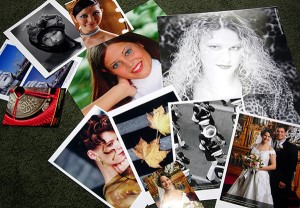 Photo 1
Upper left are piezo and thermal bubblejet inkjet photos; large central photos are LED and laser images printed on Kodak paper using traditional RA-4 developing. The bottom row are all dye sublimation or dye transfer images; lower front 4"x6" dye sublimation print from Picture Maker Kodak kiosk. All are high quality glossy photos.
And even with Kmart, Walgreens, and Wal-Mart pushing to educate and encourage digital printed photos, still only 25% of digital camera users actually get their digital images printed. So what's a framer to do? Though some 97% of individuals claim to be interested in having their photo snapshots printed out, most never actually do it. Appearance, slow print speed, and cost of at-home photo printing is giving new blood to the free standing commercial photo kiosk.
Commercial Kiosks
Kiosks are the free standing, user friendly units from Kodak, Fuji, Sony, et al. that have been seen almost everywhere from full service drug stores and discount centers to shopping malls. I remember seeing my first Kodak kiosk back in the early 90s, which was basically just a glorified copy station. So you could get out the red-eye, blow it up, cut things out, add cutesy borders, then print. You could get what you wanted, and do it yourself. Fabulous innovative computer hands-on technology. And perfect for the scrap booking revolution that was to soon follow.
Today, kiosks are consumer friendly complete digital input sites, developed by a host of assorted manufacturers and found commonly in large retail operations. Today, kiosks produce prints from memory cards, CDs, or traditional film while still cropping, enlarging and editing. Welcome to the real 21st century. Now we are able to do it ourselves, more professionally, or with help.
There are free standing kiosks will print images on-site as you wait, or units that will send your electronic information to the store's on-site minilab that will generally offer 1-2 hour processing while you shop. The major difference between these two kiosk printer, besides doing-it-yourself or having it done for you, is the technical process behind the resulting photo image. The free standing do-it-yourself kiosk produces a digital dye-sublimation print, while the in-store minilab uses a chemical developing process on traditional RA-4 photo paper.
Recent email chat on PPFA Hitchhikers and TheGrumble has included framing retailers considering getting into the photo kiosk business. The framer would be more limited to the dye-sublimation do-it-yourself models unless they have the resources to also install a minilab. This could be a great source for one-stop shopping, whether standard size ready-made photo frames or for custom framing. Once your customer has printed their dye-sublimation images, then why not have them framed?
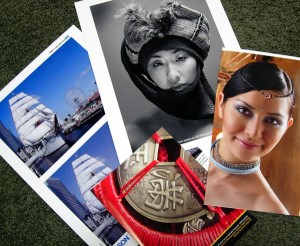 Photo 2
Mitsubishi CP2000DU dye sublimation (portrait left); Olympus P-400 dye sublimation paper and printer (leaf study); black and white dye sublimation on Kodak paper; Kodak 8500 printer dye transfer. Sometimes the giveaway is a slight pearlized appearance of the back of the paper, the name of the company, and/or the 8½x11" print format.
Types of Digital Images
The basic types of digital imagery associated with consumer photo printing include dye-sublimation, laser, and inkjet printing. Plus under inkjet there are the additional subcategories of phase change, thermal and piezo printers. Different technologies have different time, temperature, and moisture tolerances, so understanding digital processes are vital to the mounting and framing of digital photos.
Dye-sublimation Prints
Kiosks aside, the Kodak 8500 and 8660 are among the portable dye-sublimation (aka dye transfer) models often used by professional wedding photographers, but too pricey for the general consumer. Of course wedding photography and memorabilia is a common custom framing topic so it should be known these images are often dye-sub technology.
Dye-sublimation is a high temperature thermal transfer of inks pressed onto a wax-like paper, also called dye transfer. The high temperatures required during the transfer process are so much greater than any dry mounting temperatures (in the high 300̊F range) these images are totally heat tolerant. And since they are also moisture resistant they may be wet, dry, or pressure-sensitive mounted as any traditional photo. The chemicals and solvents in most spray adhesives would be best kept away from these images though.
Dye-sublimation papers may have a bit of a pearlized look and very slightly texture to the back side, and may say Mitsubishi, Kodak Image Magic, or Sony Electronic, among others. This helps the framer attempt to identify what exactly they have as in traditional photo or digital dye-sub photo. Obviously the wedding photographer could fill in the blanks when there id a question over the handling of these images also.
Small in-home photo printer docks using PictBridge connection technology are also dye-sublimation printers. Common affordable models include: Olympus P-10 Printer, Sony DPP-EX7, and Canon CP400. Though often limited to 4x6" images, these are the quickest and simplest way to print quality photos at home.
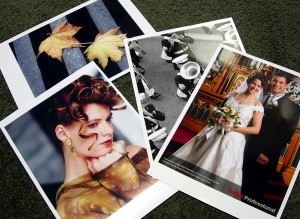 Photo 3
Shot printed on Epson Stylus Photo 785EPX piezo printer on Epson Premium Glossy Paper (ships); Epson 2200 piezo pigment printer with Lyson Daylight Darkroom system on 320 Darkroom Gloss paper (black and white portrait); HP thermal bubblejet printer using HP gloss photo paper; cropped image from a Kodak ENCAD Novajet 1000i thermal wide-format printer on Kodak Glossy Photo Paper and thermal inkjet dye inks (Chinese coin).
Laser on Photo Paper
Laser printed digitals on photo paper look and feel like traditional photos because they have been printed on the same type of paper, just using a different process. In a traditional darkroom, photos are developed by projecting light through the original film exposing and processing the paper using RA-4 chemistry. A digital darkroom, uses bits and bites of computer information exposes the photo paper to red, green and blue lasers (or LEDs), then the paper is processed using RA-4 chemistry.
These laser printers are not the same black-and-white laser text printers we would purchase for home-office use, they are expensive, large format units for professional developing in minilabs. Common laser equipment will use papers like Fuji Crystal Archive or Kodak Professional Paper. Since these photos have been printed on real photo paper using traditional RA-4 chemistry they may be mounted using any desired technique, but orange peel needs to be controlled by selecting a smooth substrate and high gloss scuffing possibilities should be considered if dry mounting.
Inkjet Prints
Inkjet printers including Hewlett-Packard, Epson and Lexmark are well known common home office printers which also print digital photos. Most of these will be limited to 8x10" photo size based on actual printer limitations. Consumer photo papers are available for inkjet that will produce nice photographic results, but it is reminded that using proper OEM materials will produce the best end product. By that I mean Epson printers should use Epson inks on Epson Photo Papers. And the best images must also have been shot for approximate printed size at high resolution, and in turn printed at high resolution, which uses a lot of ink.
Inkjet technology varies with manufacturer, but basically it is the process of spitting ink onto the receptive paper of choice. Though printer manufacturers are integrating surface coatings to help make images more moisture resistant after drying, water and moisture based mounting techniques should be avoided.
Hewlett-Packard, Canon S-series, and Lexmark thermal printers are heat sensitive at temperatures over 155°F and at time durations of over 30 seconds. Epson piezo printers are heat tolerant for any time and temperature. Solvents do not impact water based inkjet inks, but water moisture might, so be careful of adhesive choices. Perhaps pressure-sensitive adhesives or low temperature/short duration heat activated boards are the best choice. Fortunately many of these photo papers will state Epson, Hewlett-Packard, Kodak Electronic Imaging Paper, or something that helps designate its origin.
Snapshot vs. Fine Art
There are assorted categories that define and cluster digital images and digital printing types together. One, as mentioned above, designates the image variations between traditional RA-4 photo developing and pure digital. Another important category establishes the difference between the consumer snapshot and the fine art digital photo. Fine art digitals are often printed on wide format printers using the highest quality papers and inks, as with the giclée you've heard tell about.
Professionally printed digital photos can have more vibrant color and the image may appear much crisper, somewhat like an Ilfochrome Classic (aka Cibachrome). Glossy photo quality papers are also available for wide format high end inkjet printers (not laser) that make it very difficult to tell digital photos from traditional developing.
The scanner, printer, dyes and paper all come together to print the most photographic looking photo. The more vibrant dye based inks sometimes have higher light fade issues though, with shorter image life span. But even that is being worked on by printer and ink manufacturers. So mounting is not the only fear when handling a digital photo, but so is lightfastness, so framing with UV protective glazing is highly suggested.
Mounted or Not?
So, should a digital photo be mounted or not? Depends on the photo and your ethical beliefs behind photos in general. The photo jury (meaning photo conservators) remains out on this one regardless of traditional or digital, small or wide-format, snapshot or fine art, making it a green light for framers any way they choose to handle photos. The bigger question is what type of photo is it? Will it tolerate heat? And does it need to be kept away from moisture or solvents?
All photos should be glazed, digitals even more so. They need greater protection from the elements.
In conclusion, do your homework, ask customer questions and know what you are dealing with. The dye-sublimation or RA-4 print from Kmart will mount, laminate AND even canvas transfer just fine as long as you know that's what you have to work with!
END
Copyright © 2005 Chris A Paschke
For more articles on mounting basics look under the mounting section in Articles by Subject.
Additional information on all types of mounting is found in:
The Mounting and Laminating Handbook, Second Edition, 2002,
The Mounting And Laminating Handbook, Third Edition, 2008 and
Creative Mounting, Wrapping, And Laminating, 2000 will teach you everything you need to know about getting the most from your dry mount equipment and materials as an innovative frame designer.
All books are available from Designs Ink Publishing through this website.
Chris A Paschke, CPF GCF
Designs Ink
Designs Ink Publishing
785 Tucker Road, Suite G-183
Tehachapi, CA 93561
P 661-821-2188
chris@designsinkart.com